Armrests are one of those office-chair features that are easy to ignore when comparing chairs online. A product page may proudly advertise "4D armrests", but that label does not tell you whether the armrests will actually feel comfortable at your desk.
What matters is where your forearms sit, whether your shoulders can stay relaxed, and whether the chair can still move close enough to your desk. The 2D, 3D and 4D labels are useful, but they are only a starting point.
My quick take
If you are choosing between chairs, I would prioritise height adjustment first. After that, width, forward/backward movement and pad rotation can make the fit better. A well-designed 2D armrest can be more useful than a poorly designed 4D armrest.
Why office chair armrests matter
Your arms are not weightless. During typing, mouse work, reading or simply sitting back, your shoulders and upper-back muscles may have to support your arms when there is nowhere else for them to rest.
A correctly adjusted armrest provides a place for the forearm to rest while allowing the shoulders to remain relaxed. It can also make it easier to change position during the day.
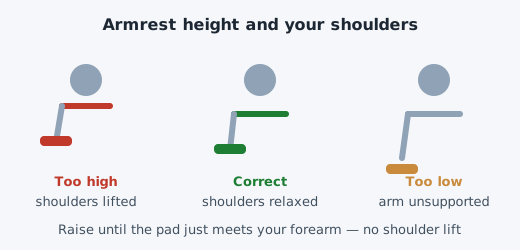
But an armrest can cause the opposite problem when it is too high. If the pad forces your forearms upward, your shoulders may remain slightly raised instead of relaxing. That is why adjustability matters more than simply having armrests.
What does the "D" in 2D, 3D and 4D mean?
The "D" generally refers to the number of adjustment directions. However, there is no universal industry rule that requires every manufacturer to use these labels in exactly the same way.
One company's 3D armrest may have a slightly different combination of movements from another company's 3D armrest. When shopping, look at the actual movements rather than assuming that a higher number automatically means a better armrest.
| Type | Typical adjustments | What it helps with |
|---|---|---|
| Fixed | No adjustment | Basic arm support |
| 1D | Height | Matching armrest height to your arms |
| 2D | Height + one additional movement | Better basic fit |
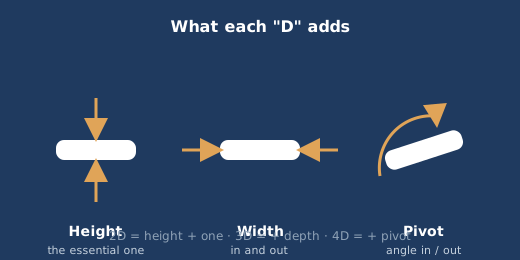
| 3D | Height + width + depth | More precise positioning |
| 4D | Height + width + depth + pivot | Fine adjustment for different tasks and body sizes |
Treat this table as a general guide rather than a strict specification. Always check the manufacturer's description of the actual armrest movements.
Fixed armrests
Fixed armrests are the simplest option. They are usually sturdy and inexpensive, but they give you no way to correct a poor fit.
If the armrests happen to match your body and desk height, they can work perfectly well. The problem appears when they are too high, too low, too wide or positioned too far forward.
There is another practical issue: desk clearance. A fixed armrest that is taller than the underside of your desk can stop the chair from moving close enough to the keyboard.
1D armrests: height adjustment
A 1D armrest normally moves up and down. It sounds basic, but this is probably the single most useful adjustment to have.
People have different body proportions, desks have different heights, and chairs have different seat-height ranges. A fixed armrest cannot account for all three.
Height adjustment lets you raise or lower the pad until your forearms receive support without forcing your shoulders upward.
2D armrests
2D armrests generally provide height adjustment plus one additional movement. Depending on the chair, that second movement may be width adjustment, pad movement or another mechanism.
Width adjustment can be particularly useful if the standard armrest spacing feels too wide for your body. Bringing the pads closer can allow your elbows to remain nearer to your sides without forcing your arms outward.
Because manufacturers use the term differently, I would always check the product's actual specifications before assuming what "2D" means.
3D armrests
3D armrests usually add another direction of movement, commonly forward and backward adjustment alongside height and width.
Depth adjustment becomes useful when the natural resting position of your forearm does not line up with the fixed position of the armrest pad.
It can also be useful when you change tasks. For example, the position that feels comfortable while typing may not be exactly the same position you prefer while leaning back to read.
4D armrests
4D armrests typically add another adjustment, commonly allowing the arm pad to pivot or rotate inward and outward.
That extra movement can help the pad follow the natural position of your forearm rather than forcing the arm into one fixed orientation.
It is a useful feature, particularly if you spend many hours at the desk, but it should not be treated as a guarantee of comfort. The quality of the armrest mechanism, pad shape and range of movement still matter.
How to adjust office chair armrests correctly
There is no benefit in having highly adjustable armrests if they are left in the wrong position. Use this sequence instead.
- Set the chair height first. Make sure your feet are comfortably supported and your working position at the desk feels natural.
- Position your hands for normal work. Sit as you normally would when typing or using your mouse.
- Raise the armrests gradually. Stop when they lightly support your forearms without lifting your shoulders.
- Adjust the width. If available, move the pads so your elbows can stay reasonably close to your sides.
- Adjust the depth. Move the pads forward or backward so the useful part of your forearm rests comfortably on them.
- Adjust the pivot. If the pads rotate, use that movement to find a natural position for your forearms.
- Check the desk. Make sure the armrests do not prevent the chair from getting close enough to the desk.
A simple test for the correct height
After adjusting the armrests, let your arms relax completely. Your shoulders should feel loose rather than elevated.
Then place your hands on the keyboard or mouse and check whether you feel as though the armrests are supporting your arms rather than pushing them upward.
If your shoulders immediately rise when you place your forearms on the pads, lower the armrests and try again.
Armrests and desk clearance
This is one of the easiest details to overlook when buying an office chair.
Imagine finding a chair that feels comfortable, but its armrests are too high to pass underneath your desk. You may then have to sit several centimetres farther away from the keyboard.
That changes your entire working position. You may reach forward, lose contact with the backrest, or start leaning toward the monitor.
Before buying a chair, measure the vertical clearance beneath your desk and compare it with the chair's armrest height range. This is especially important if the armrests are fixed.
Do you actually need armrests?
No. Armrests are useful, but they are not mandatory for a comfortable office chair.
Some people prefer to sit close to the desk and allow the desk surface to support their forearms. Others like being able to move their arms away from the keyboard and rest them on the chair.
The best choice depends on your desk, working style and chair. What matters is that the armrests do not force you into a worse position.
If fixed armrests repeatedly get in your way, check whether they can be removed before replacing the entire chair.
Common armrest mistakes
- Setting them too high: Your shoulders remain elevated instead of relaxed.
- Setting them too low: Your forearms receive little useful support.
- Keeping them too far apart: Your elbows are pushed outward unnecessarily.
- Moving them too far forward: The pads may support your wrists rather than your forearms.
- Ignoring desk clearance: The chair cannot move close enough to the desk.
- Buying based only on the "4D" label: More adjustments do not automatically mean a better-designed armrest.
What makes a good armrest pad?
Adjustment is only half the story. The surface of the armrest also affects how it feels during a long workday.
Hard plastic pads can be durable and easy to clean, but some people find them uncomfortable when their forearms remain on them for several hours. Softer polyurethane or padded surfaces generally provide a more cushioned contact point.
I would also pay attention to the shape and width of the pad. A very narrow pad may technically be adjustable but provide little useful support.
If the mechanism is good but the pad itself is uncomfortable, replacement pads or covers can sometimes improve the chair without replacing the entire armrest assembly.
Which armrest adjustment matters most?
If your budget is limited, I would prioritise the adjustments in this order:
- Height — the most important adjustment for matching the armrest to your working position.
- Width — useful for getting the armrests into a natural position relative to your body.
- Depth — useful for positioning the pad under the part of your forearm that you naturally rest.
- Pivot — helpful for fine-tuning the angle of the arm pad.
This is why I would not automatically choose a chair with 4D armrests over a well-built chair with simpler adjustments. The range and quality of movement are more important than the number printed in the product listing.
2D vs 3D vs 4D: which should you buy?
For occasional computer use, simple height-adjustable armrests may be enough. If you spend most of your working day at a desk, additional adjustment can become more valuable because small differences in body position become noticeable over many hours.
| Armrest type | Best for | My view |
|---|---|---|
| Fixed | Simple setups and tight budgets | Only if the height already suits you |
| 1D | Basic ergonomic adjustment | Good minimum to look for |
| 2D | Users wanting a better basic fit | Good value when well designed |
| 3D | Long working hours and varied tasks | Useful extra flexibility |
| 4D | Users who want maximum adjustment | Excellent when the mechanism is genuinely useful |
What I would check before buying
When I compare office chairs, I would not stop at the product description saying "4D armrests". I would look for the actual range of movement and how the armrests interact with the rest of the chair.
Before buying, check these points:
- How low and high can the armrests go?
- Can the pads move closer or farther apart?
- Can the pads move forward and backward?
- Can the pads rotate?
- Is the adjustment mechanism easy to use while sitting?
- Can the chair fit underneath your desk?
- Is the pad wide and comfortable enough for your forearms?
- Does the armrest feel stable when you put weight on it?
These details tell you much more about the usefulness of an armrest than the "2D", "3D" or "4D" label by itself.
Armrests are only one part of the chair
Good armrests cannot compensate for a poorly fitting chair. Seat height, seat depth, back support, recline, lumbar support and desk height all affect how you use the armrests.
For example, if your seat is too low and the desk is fixed at a high position, you may raise the armrests simply to reach the desk. That does not mean the armrests are correctly adjusted. The underlying problem is the relationship between your chair and desk.
This is why armrest adjustment should be the final part of your setup rather than the first.
My final recommendation
If you are buying a new office chair, I would consider height-adjustable armrests the practical minimum if you plan to use them regularly.
Move to 2D, 3D or 4D depending on how much adjustment you need and what the rest of the chair offers. For someone working at a desk for many hours, 3D or 4D can be worthwhile, but only when the adjustment range is useful and the mechanism is well made.
Most importantly, don't buy a chair simply because the product page says "4D". Sit normally, relax your shoulders, place your hands where you work, and see whether the armrests actually support you without interfering with the desk.
Conclusion
Office chair armrests are simple in principle: they should give your forearms somewhere comfortable to rest while allowing your shoulders to stay relaxed. The 2D, 3D and 4D labels describe how much adjustment is available, but the number itself is not a guarantee of quality.
If you are choosing between chairs, start with height adjustment, then consider width, depth and pivot based on your body and working habits. Always check desk clearance as well.
A chair with fewer adjustments that fits you properly is usually a better choice than a chair with a long list of features that you cannot use effectively.
For the bigger picture, see our ergonomic office chair buying guide and our guide to choosing the right chair height for your desk .